
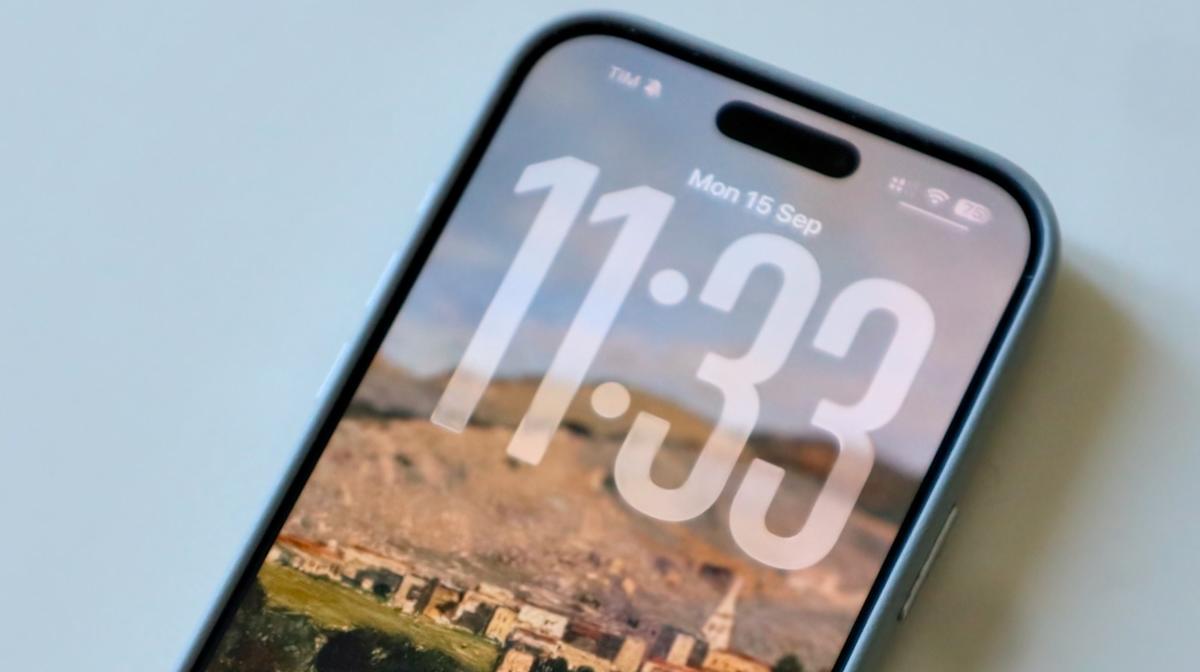
After an extensive three-month beta testing phase, Apple has officially launched iOS 26 to the public. This update marks a significant evolution since the days of iOS 7, though its initial rollout faced challenges surrounding its standout feature, the innovative Liquid Glass design. However, by the time the Release Candidate version was introduced after the fall press event, the software began to align with expectations.
In contrast to previous iterations, Apple is undertaking a comprehensive transformation of the entire iOS experience, keeping familiar elements for users while signaling a major shift. By skipping from iOS 18 to iOS 26, Apple aims to promote greater consistency across its software platforms, clearly indicating that substantial innovations are on the horizon.
In our review of iOS 26, we delve into the highlights, drawbacks, and everything in between, drawing insights from the three months of testing and the pre-release candidate phase.
**Liquid Glass: A Shift, but Not a Revolution**
Reflecting on Jony Ive’s reveal of iOS 7 years ago, one remembers the stark contrast from iOS 6. However, iOS 26 does not elicit the same dramatic shift. While Apple touts it as “beautiful, delightful, and instantly familiar,” the user experience feels more like an iterative refinement. Though users will notice various enhancements across the Lock Screen, Home Screen, Control Center, and app designs, the essence remains consistent.
What stands out is the increased cohesion across devices. The Mac has embraced features and aesthetics from iOS and iPadOS, while iPadOS takes a cue from macOS, generating a more unified user experience. Even more, the interactions across the new “26” enhancements feel refreshingly engaging, from the subtle toggles to smooth page transitions, making it enjoyable even for those not upgrading to the latest iPhone 17 models.
**Boosting Apple Intelligence**
The focus on the Liquid Glass design dominated the WWDC 2025 keynote, but iOS 26 also introduces critical enhancements surrounding Apple Intelligence.
In a refreshing change from earlier, lackluster AI introductions, Apple has delivered accessible features right from day one in iOS 26. Key highlights include onscreen ChatGPT integration, allowing users to converse with AI about on-screen content, as well as the creation of a Genmoji by merging two emojis. The revamped Shortcuts app now enables users to build their own Apple Intelligence chatbot, expanding creativity and personalization.
Moreover, Apple embraces real-time translation in Phone, FaceTime, and Messages, equipping users with a tool akin to Google’s Circle to Search, alongside promising Apple Intelligence capabilities across multiple apps. Nonetheless, despite these advances, Siri continues to underperform in everyday tasks. Instances where simple commands like playing a playlist result in error messages highlight the urgency for improvements to the personal assistant.
**Elevating Apple’s Ecosystem**
If you’re deeply integrated into Apple’s ecosystem, the benefits of iOS 26 become clearer. New features in iMessage like polls, background support, and safer messaging through screening new senders enhance the experience for Messages users.
Additionally, Apple Music introduces Lyrics Translation and Pronunciation for varying languages, auto-pinning favorites in your media library, and animated album covers on the Lock Screen. However, if you lean toward services like Spotify, these innovations might go unnoticed.
But it’s important to highlight a downside: during testing, the AutoMix feature in Apple Music, which is supposed to blend tracks seamlessly, struggled by failing to recognize song transitions accurately. Listeners often found themselves hearing overlapping vocals from different artists, suggesting a need for refinement, particularly in lyrical pieces.
**Battery Life and Reliability on iOS 26**
Throughout testing, iOS 26 exhibited concerning battery drain. Apple’s new Adaptive Power Mode, unfortunately, did little more than remind users of high usage and activating Low Power Mode at 20% battery. Despite activating this feature over the past month, the difference felt negligible.
After upgrading to the iOS 26 Release Candidate, battery performance on my iPhone 16 Pro Max started to resemble that of iOS 18. While it doesn’t eradicate the need for a recharge before the day ends, it offers a reassuring return to familiar usage patterns.
Stability is another strong point; the iOS 26 RC version has proven reliable, free of significant bugs or issues. While developers will need time to optimize their apps for the new software, day-one users can expect a smooth experience overall.
**Is iOS 26 Worth Installing?**
Absolutely—if you own an iPhone 11 or newer, installing iOS 26 is a clear choice. While Liquid Glass showcases Apple’s forward-thinking design ethos, don’t anticipate major shifts in your day-to-day interactions with your device.
In recent discussions with friends about iOS 26, responses have been lukewarm, despite notable appreciations for the Lock Screen’s refreshed look with its larger clock and cleaner icons.
This upgrade is a logical step toward enhancing the cohesiveness of Apple’s software ecosystem. I’m eager to see future updates, as unannounced features hint at further enhancements in the pipeline. Stay tuned for exciting developments in the weeks and months ahead.
 Priyam Gera